Register for Apps DBA Training
For Apps DBA Beginner's
  • Start From Here
  • Order of Apps Study
  • 11i Software
  • Apps Architecture
  • Install Apps 11i
  • Install Apps 11i Part II
  • Startup/Shutdown
  • Request Flow in Apps
  • Various TOP's
  • Cloning Basics
  • Cloning I
  • Cloning II
  • Autoconfig Basics
  • Autoconfig Config File
  • Template Files in Autoconfig
  • Discoverer Overview
  • Workflow Mailer in Apps
  • Printing Overview
  • Configuring Printers
  • Pasta Printing
  • Performance Overview
  • Install 10g Application Server
  • Apps DBA Certification
  • Common DBA Topics
  • Scared of RAC ?
  • Install RAC on your laptop part I
  • Step by Step build RAC part II
  • Step by Step install RAC using VMWare part III
  • Install Oracle RAC Database part IV
  • oraInventory Basics
  • Install Database 10.2.0.1
  • Upgarde DB to 10.2.0.2
  • Fusion
  • Is Fusion a conFusion ?
  • Fusion Middleware Overview I
  • Fusion Middleware Overview II
  • Application Integration Architecture
  • SOA Install Part I
  • SOA Install Part II
  • SOA Install Part III
  • Install BPEL Process Manager
  • Apps Integration OID/SSO
  • Management Qs for Apps Integration with SSO/OID
  • 25 things your DBA should know for Apps/SSO integration
  • Identity Management
  • COREid Overview
  • Oracle COREid or Idm & Access Mgmt overview
  • Installing Access Manager 10.1.4
  • WebGate request flow
  • Identity Manager Architecture
  • Installing Identity Manager
  • OAS-SSO Overview
  • OID Overview
  • OID Basics II
  • OID Cluster
  • OID Integration with Other LDAP Servers overview
  • Integrate OID with AD I
  • OID Replication Overview
  • Multi Master OID Replication
  • Migrate OID/SSO to new Host
  • Apps R 12
  • Socket or Servlet in R12
  • Startup/Shutdown Scripts in R12
  • Unified APPL_TOP
  • Apps R 12.0.1
  • Difference between 11i & R12 Technical
  • Prepare for R12 Installation
  • Install VMWare on Windows for Linux Install
  • Install Linux for Apps R12 Install
  • Install Apps R12 on Linux Virtual Machine
  • R12 Upgrade & database
  • R12 Fils System Changes
  • R12 Release Date
  • 10g Application Server
  • 10g AS Overview
  • Installing 10g AS
  • Start/Stop 10g AS
  • Web Cache Basics
  • Single Sign-On Overview
  • OID Overview
  • Cloning 10g AS
  • 10g AS Middle tier Cloning & Overview
  • OID Cluster Imp. Points
  • CPU Patch, Infra Tier
  • CPU Patch, Middle Tier
  • AS Guard / DR Overview
  • Oracle Apps 11i
  • My Site
  • Apps DBA Scripts
  • Apps DBA Interview Q's
  • 11i JVM's
  • Apps Training in India
  • 11i Health Check
  • Good Metalink Notes
  • About Me  
  • For Advanced Apps DBA
  • URL Firewall in DMZ Setup
  • Upgrade Apps to 11.5.10.2
  • Load Balancer Overview
  • Load Balancer Config
  • HTTP layer Load balancing in Apps 11i
  • Dataguard Overview
  • Configure Dataguard / Standby database
  • Standby Site for Apps 11i
  • How to change Hostname on Apps Instance
  • SSL Overview in Apps
  • Configure SSL to Web Server
  • Key Points for SSL in Apps
  • Reduce Patch Timing
  • Reduce Patch Timing II
  • Shared APPL_TOP Overview
  • Configure Shared APPL_TOP
  • 11i Database Upgrade I
  • 11i Database Upgrade II
  • Change Session TimeOut
  • Patching
  • Apps Patch Basics
  • Apps Patch Basics II
  • Apply Apps Patch
  • CPU Overview
  • Steps to Apply CPU Patch
  • CPU Patch on Infra Tier
  • CPU Patch on AS Middle Tier
  • Troubleshooting
  • Web Server TS Part I
  • Web Server TS Part II
  • CM Troubleshooting
  • 10g Discoverer with Apps
  • Discoverer Bascis in Apps
  • Discoverer 10g Upgarde Basics
  • Discoverer 10g Configuration Steps with 11i
  • Collaboration Suite
  • Collaboration Suite
  • Calendar Overview
  • Sync Calendar from Mobile I
  • Sync Calendar from Mobile II
  • OCS Mail Architecture
  • Apex / HTMLDB
  • Install Apex 2.2
  • Apex with SSO part I
  • Apex with SSO part II
  • SSO Authentication Schemes
  • Certification
  • Possible Certifications for DBA
  • Apps DBA Certification
  • 1Z0-311-OCA-10g OAS Overview
  • 1z0-312-OCP-10g OAS Overview
  • 1z0-312 - Managing Customization and Topology
  • 1z0-312 - Cloning and Staging OAS
  • Apps DBA Jobs
  • Working / Apps DBA in UK
  • Oracle Recruiting Apps DBA's
  • Apps DBA Jobs Updated Regularly
  • Apps Job at Satyam
  • Useful Links
  • Good Metalink Notes
  • petefinnigan's Oracle Security
  • Linux Basics
  • Atul Mehta's Oracle Links
  • Others
  • Apps DBA Training Institute
  • 1 Year Journey of this Blog
  • How To ?
  • Change APPS Password
  • Preserve Customizations
  • Blog Roll
    Apps / E-Business Suite
  • Steven Chan Apps
  • Anil Passi Technical
  • Fadi Apps DBA
  • Senthil Apps DBA
  • Bas Klaassen EBS DBA
  • Sam Apps DBA
  • Black Geek Apps DBA
  • Bandari Apps
  • Vikram ERP Architect
  • OraBiz
  • Eric Core DBA
  • SOA
  • Navdeep Saini Apps DBA
  • tugdualgrall Web Services
  • Mohan Dutt's Apps Certification
    IdM
  • Nishant Kaushik's IdM
  • Nulli Blog, OAM
  • Identity Musing
  • Identity nd Access Management
    Core DBA
  • Vidya Bala DBA
  • Sabdar DBA
    Data Management
  • Ivan Pellegrin Data Management


  • We have moved to http://onlineAppsDBA.com kindly check http://onlineAppsDBA.comin future
    Pasta Printing with Oracle applications 11i
    Tuesday, January 02, 2007
    Register for R12 upgrade
    Today & in next post I'll cover on Pasta & XML publisher for printing . In order to understand Pasta first you need to understand why you need Pasta in Printing & later about what is pasta & how to implement it in Oracle Applications.

    In order to understand need for Pasta , you should know about PostScript...

    What is Post Script ?
    As per WebOPedia PostScript is primarily a language for printing documents on laser printers developed by Adobe Systems.

    What is Pasta ?
    Pasta is Oracle Application utility to convert text report files to Post Script so that these can be printed by PostScript Printres. Executable name for Pasta is FNDPSTAX
    For various printing options via Pasta, you can use pasta configuration file called as pasta.cfg

    How to Setup basic Pasta Printing in Oracle Applications ?
    If you wish to use PostScript printer to print Text or Post script reports , you need to select printer type as "--Pasta Universal Printer" from list of values; while defining printer.
    For more information on how to define printer check previous posts at
    http://becomeappsdba.blogspot.com/2006/09/printer-basics-in-oracle-apps-11i.html
    http://becomeappsdba.blogspot.com/2006/09/configuring-printer-in-oracle_28.html

    Where to find more information on Pasta Printing ?
    You can get everything related to Pasta advanced configuration in Oracle Applications System Administration Guide, Volume 1 Part No. A96155-03 , chapter 7-13 Printer Setup with pasta

    Additional Metalink Resource for Pasta Printing

    356501.1 How to Setup Pasta Quickly and Effectively
    267026.1 How To Set The PASTA Debug Option
    239196.1 PASTA 3.0 Release InformationNote
    358879.1 The Pasta Landwide Driver Truncates / Cuts Off The Right Side Of The Report 179801.1 Printing and Previewing Arabic Reports using PASTA in Oracle Apps 11i
    308949.1 How To Print Reports In PDF Format Directly From The Concurrent Manager 135137.1 PASTA Required For Printing With UTF8 For Any Release Of 11.5

    Do you wish to help other Apps DBA's ?
    Those of you who wish to help Apps Newbie by answering their queries or moderating comments/answers at forum http://teachMeOracle.com/forum please update you mail ID here or drop a mail to me at atul_iiit@yahoo.com .
    Your few minutes can make big difference to some one's life .....

    Labels: ,


    We have moved to

    http://onlineAppsDBA.com

    kindly check onLineAppsDBA.com in future

    add to del.icio.usdel.icio.us  ¦  digg thisDigg This  ¦  My Yahoo!My Yahoo  ¦  RedditReddit  ¦  add to BlinkListBlinkList   ¦  Furl ItFurl It  ¦  Email This Email This  ¦     Leave Your Comments
    posted by Atul Kumar @ 1:55 PM   11 Comments


    We have moved to http://onlineAppsDBA.com kindly check http://onlineAppsDBA.comin future
    Printer Basics in Oracle Apps 11i
    Wednesday, September 27, 2006
    Register for R12 upgrade

    Well lot of my readers were pushing me to write on printer configuration and I was dragging it since long but now as I have started getting lot of mails of printer step(either for certification or for interview) so finally I decided to start with Printers Basics & to understand printers in Apps Understanding these basics terminology is quite important.


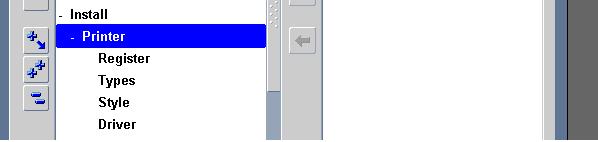
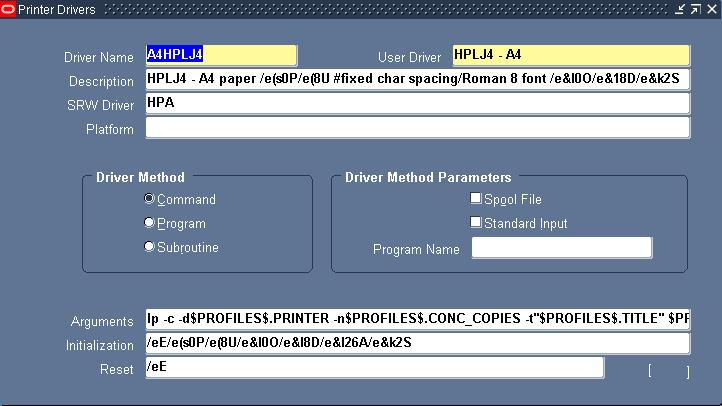
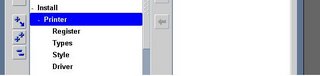
    Printer Drivers : As you see in last section under Install -> Printer Section, driver delivers command to printer about how to output a specific print style. You can understand them as series of instructions used by print style for a particular printer.
    Example of Drivers is A4HPLJ4
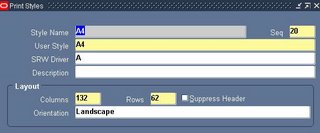


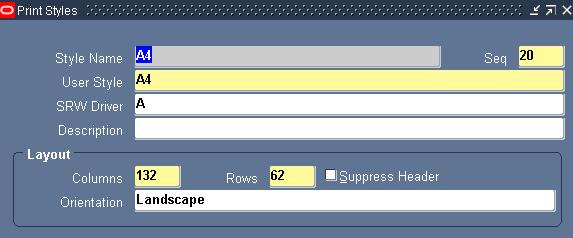
    Printer Style : Tells printer how printed output should look, for ex. Number of lines in page, width of line , whether header to print or not. A printer can have more than one style as long as printer supports it. If a print style is available & registers for a particular printer then only it will be visible to user (In some CM reports these styles are predefined and can't be changed)
    Example of Print Style is A4
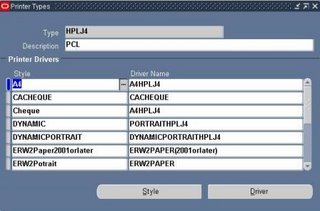


    Printer type : is to identify printer by manufacturer & model number for ex. HP laser Jet III

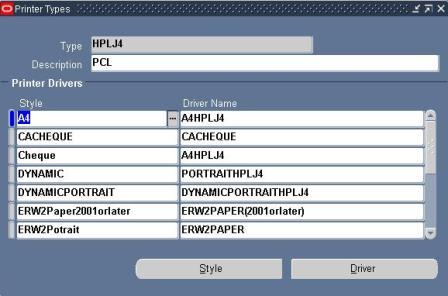
    Printer Type form in Apps ( Install -> Printer -> Types) associate Style with Driver Name .
    For Ex. with Printer Type HPLJ4 , you see style A4 & driver A4HPLJ4


    SRW - Stands for SQL report writer driver file, Thing to Note w.r.t. SRW Driver file is that
    If a report is for online viewing, report uses SRW named by print style in print style form.
    If a report is for Printing , report uses SRW driver named by oracle Apps printer driver in Printer Drivers form.

    Almost all standard Printer Types, Printer Driver & Printer Style are preconfigured in Apps. You just need to register your printer with Applications .

    A lot more on how to register printers in Oracle Applications , Pasta Printing & using XML for printer in next Updates ..

    For those whose mails I have not responded yet , thanks a lot for your patience I will try to respond you all ASAP .

    Labels:


    We have moved to

    http://onlineAppsDBA.com

    kindly check onLineAppsDBA.com in future

    add to del.icio.usdel.icio.us  ¦  digg thisDigg This  ¦  My Yahoo!My Yahoo  ¦  RedditReddit  ¦  add to BlinkListBlinkList   ¦  Furl ItFurl It  ¦  Email This Email This  ¦     Leave Your Comments
    posted by Atul Kumar @ 8:52 PM   25 Comments
    About Me


    Name: Atul Kumar
    Home: London, United Kingdom

    About Me: I am Independent Oracle consultant. If you wish to hire me on Contract or to Quote on project basis contact me at
    atul @ onlineappsdba.com

    See my complete profile

    View Atul Kumar's profile on LinkedIn

    E-mail Subscription

    Enter your email address:

    Delivered by FeedBurner

    Search
    Only search this Blog
    Categories
  • Advanced Topics
  • Application Server
  • Apex / HTMLDB
  • Apps 11i
  • Apps R12
  • Autoconfig
  • Basics
  • Certification
  • Cloning
  • Discoverer
  • Fusion
  • OID
  • Patching
  • Printer
  • Single Sign-On
  • Useful Sites & Forum
  • Previous Post
    Archives
    Add On
     

    Add to Technorati Favorites


    Add to Google


    Add to My AOL


    Subscribe in Bloglines


    Subscribe in NewsGator Online

     
    Powered by


    Hits Since 30, Jul 06

    Blog Counter

    Technology Blogs - Blog Top Sites
    Comments
    ADs
    Copyright © 2006 teachmeoracle.com All rights reserved Presented by Atul Kumar