|
| Oracle Internet Directory - Basics II |
| Thursday, September 20, 2007 |

|
We have moved to http://onlineAppsDBA.com kindly check http://onlineAppsDBA.comin future
Few years ago, When I started learning Oracle Internet Directory I jumped directly on administration of OID (including start/stop and debugging) without understanding basics of OID. My suggestion is to go through basics first which I am going to cover in this post.
For my first post on OID visit OID from Apps DBA's eye
Need of Oracle Internet Directory ?
Use of Oracle Internet Directory (Oracle's LDAP) is much bigger and can't be explained in this post but here is few bits which you is enough for time being (to get you started on OID).
--OID is repository for enterprise users, groups data.
--Information about various applications (Portal, BI, E-Business Suite, Collaboration Suite) registered to OID (You can register E-Business Suite or Database in OID).
--Password policy for Single Sign-On Partner Applications
What are different Daemon/Server in OID ?
There are three servers/daemon in OID
---OIDLDAPD - This is the main server/daemon waiting for ldap request (ldapsearch, ldapadd, ldapmodify, ldapdelete..). When any application want to do any ldap operation(add, modify, delete, search..) on OID object (user, group, application..), that request is fulfilled by this server/daemon.
---ODISRV - also called as Oracle Directory Integration Server, this is used for integration of Various Application (Portal, BI, E-Business Suite/Apps) with OID for user/group data. If any user/group is added/deleted in Portal/BI synchronization of that user to OID is done by this Daemon (Vice Versa). If you have Integrated Apps(11i/R12) with OID/SSO then users is provisioned/de-provisioned using this daemon of OID.
---OIDREPLD - Also called as OID Replication Daemon is used if you have replicated OID. By default this daemon is disabled.
For OID Replication Overview Click Here and to know more about Multi Master Replication click here
How to Start/Stop OID ?
OID Data including status of OID Servers (OIDLAPD, ODISRV OIDREPLD) is stored in Oracle Database so in order to start OID first start Database and Database Listener. Then
To Start OID - opmnctl startproc ias-component=OID
To Stop OID - opmnctl stopproc ias-component=OID
OPMNCTL will first start OIDMON (OID Monitoring Process) and then instruct OIDCTL (OID Control) to start OIDLDAPD and ODISRV daemons.
Where to find log files related to OID ?
Logs related to OIDMON, OIDCTL, OIDLDAPD should be in $ORACLE_HOME/ldap/log directory , ODISRV related logs should be in $ORACLE_HOME/ldap/ODI/log
More on OID common tasks (including frequently used scripts) and New Features on OID 10.1.4 coming soon ...Labels: oid |
We have moved to kindly check onLineAppsDBA.com in future
|
|
|
 del.icio.us
¦ del.icio.us
¦
 Digg This
¦ Digg This
¦
 My Yahoo
¦ My Yahoo
¦
 Reddit
¦ Reddit
¦
 BlinkList
¦ BlinkList
¦
 Furl It
¦ Furl It
¦
 Email This
¦
Leave Your Comments
Email This
¦
Leave Your Comments
|
posted by Atul Kumar @ 7:44 PM
  |
|
|
|
| Integrate OID with AD Part I |
| Wednesday, May 09, 2007 |
|
|
We have moved to http://onlineAppsDBA.com kindly check http://onlineAppsDBA.comin future
 OID (Oracle Internet Directory) is LDAP (Lightweight Directory Access Protocol) Server from Oracle where as AD (Active Directory) is LDAP server from Microsoft. Almost all oracle products (E-Business Suite 11i/R12, Portal, Application Server, Forms & Reports ... ) integration with Active Directory is done via OID (OAS component). OID (Oracle Internet Directory) is LDAP (Lightweight Directory Access Protocol) Server from Oracle where as AD (Active Directory) is LDAP server from Microsoft. Almost all oracle products (E-Business Suite 11i/R12, Portal, Application Server, Forms & Reports ... ) integration with Active Directory is done via OID (OAS component).
For more information on OID click here .
http://becomeappsdba.blogspot.com/2007/02/oid-to-oidactive-directoryiplanet-other.html
Few things to note in Integration of OID with Active Directory
------------------------------------------------------------------------
1. Users can be created in AD and propagated to OID or Vice Versa or can
be created in both and then synched.
2. Password for users ----2.a) can be stored in AD and not OID(You can authenticate against AD) via External Authentication Plug-in (created in OID) ---2.b) Can be stored at both places AD & OID and synhced regularly 3. User synchronization between OID and AD (from OID side, both import & export) is done via DIP (Directory Integration & Provisioning ) component of OID 4. Synchronization of user (to & from) between OID and AD is done by predefined connector (shipped with OIDwhich you can modify/configure as per your need) 5. Synchronization between AD-OID via above mentioned connector can be one way (import only or export only) or two way (both import and export) 6. You can synch all or particular attributes of user entry which you wish to configure (this is done via mapping file- More on mapping files coming soon..)
Configuration Highlights
-------------------------------------- 1. Synchronization of users between OID & AD happens via synchronization profile (including connect detail, direction of synch, attribute and source & target domain) created during installation of OID. 2. Three provisioning profile created by default are  ---ActiveImport : Importing Changes from MS-AD to OID (DirSyn approach for tracking changes in AD) ---ActiveChgImp : Importing Changes from MS-AD to OID (USNChanged approach for tracking changes in AD ) ---ActiveExport : Exporting changes from OID to MS-AD
(More on DirSyn & USNChanged coming soon with practical examples on which one to choose depending on requirement) 3. These provisioning profiles can be customized using dipassitant
(dipassistant -gui) or using LDAP commands (ldapadd or ldapmodify)
4. If you are synchronizing from AD to OID where AD is multi-domain and global catalog is not configured againt Multi domain AD, then you need
one synchronization profile per domain for AD but if global catalogue is
configured you create only one provisioning profile against GC (global
catalog and not garbage collector); If synchronization is from OID to AD
(with multiple domain) you need provisioning profile for each domain
irrespective of global catalog (GC doesn't play a role in synch for
Export from OID to AD)
5. Decide on what information to synchronize and at what location in
directory information tree to synchronize. 
More on Integrating/synchronizing Oracle Internet Directory (OID) to Microsoft Active Directory (AD) with demo setup coming soon ....
Labels: integration, oid |
We have moved to kindly check onLineAppsDBA.com in future
|
|
|
|
del.icio.us
¦
Digg This
¦
My Yahoo
¦
Reddit
¦
BlinkList
¦
Furl It
¦
Email This
¦
Leave Your Comments
|
| posted by Atul Kumar @ 10:08 PM
|
|
|
|
| Multi Master OID Replication |
| Saturday, March 24, 2007 |
|
|
We have moved to http://onlineAppsDBA.com kindly check http://onlineAppsDBA.comin future


1. Multi Master OID replication uses database advanced replication feature
2. It uses asynchronous data propagation between supplier and consumer.
** Supplier writes changes to its change log and then send batched jobs to consumers, consumers receive change logs and applies the changes locally and then purges local changes data.
Figure on left hand side shows activity at supplier end and on right is consumer end.
All replica member in multimaster replication act as supplier and consumer at same time.
Replication process at Supplier end (Left Fig.)
1. User modify an entry in OID (Oracle LDAP Server)
2. The Oracle directory server generates a change log object in the change log object store.
3. At a scheduled time, the Oracle directory replication server launches an outbound change log processing thread. This thread translates the change log object into a row—for example, Change entry—in the change log table.
4. When a change entry is committed to the change log table, Advanced Replication immediately copies the change into the deferred transaction queue.
5. After a scheduled interval, Advanced Replication pushes pending transactions from the deferred transaction queue across the network to the consumer change log table.
Replication process at Consumer end (Right Fig.)
1. Change arrives in consumer change log table from supplier
2. The Oracle directory replication server launches a change log processing thread for each supplier, based on a scheduled replication cycle. This thread first consults the change status table for the last change applied from the supplier to the consumer.
3. The Oracle directory replication server then fetches and applies all the new changes from the change log table to the Oracle directory server.
4. The Oracle directory replication server then updates the change status table to record the last change applied from the supplier before exiting.
5. Advanced Replication copies the change status update into the deferred transaction queue.
6. After the scheduled Advanced Replication interval, Oracle Database Advanced Replication pushes pending change status updates from the deferred transaction queue to the supplier change status table.Labels: idm, oid |
We have moved to kindly check onLineAppsDBA.com in future
|
|
|
|
del.icio.us
¦
Digg This
¦
My Yahoo
¦
Reddit
¦
BlinkList
¦
Furl It
¦
Email This
¦
Leave Your Comments
|
| posted by Atul Kumar @ 2:39 PM
|
|
|
|
| Oracle Internet Directory OID |
| Monday, December 04, 2006 |
|
|
We have moved to http://onlineAppsDBA.com kindly check http://onlineAppsDBA.comin future
OID which stands for Oracle Internet Directory is part of Identity Management in Infrastructure Tier of Fusion Middleware. If you are planning to configure 10g Application Server with Apps 11i or R12 , This node might be useful for you in understanding OID . Looking at importance of OID, I am going to discuss on few important things about OID today .
OID is installed on infrastructure tier in 10g Application Server (If you want to learn basic components of Application Server you can visit my previous post at http://becomeappsdba.blogspot.com/2006/10/fusion-middleware-10g-application.html )
what's is OID ?
Oracle Internet Directory (OID) is Oracle's Implementation of LDAP (Light weight Directory Access Protocol) which is ldap version 3 compliant. OID is special kind of database repository in which information is stored in Tree structure also called DIT (Directory Information Tree).
Similar to OID , Microsoft has its own LDAP server called Active Directory (AD) and Sun's LDAP server is called as iPlanet .
Where is OID code in oracle_home ?
OID code & its corresponding log files are stored in directories under $ORACLE_HOME/ldap directory in Infrastructure Tier . This is same tier where your SSO server sits.
OID logs are stored at $ORACLE_HOME/ldap/log (This location is quite important for apps dba's for troubleshooting OID Issues). Few executables like oidctl, oidadmin, oidca, oidldapd are in ORACLE_HOME/bin .
What are default ports for OID ?
You may see different ports for OID depending on OID server version but most common is 389 non ssl OID port & 636 for SSL OID port (These are also default ldap server ports). If you don't know which ports your OID is using refer portlist.ini in $ORACLE_HOME/install (Note that this file will not list updated port if you change OID ports after Installation)
You should an entry like
Oracle Internet Directory port = 389
Oracle Internet Directory (SSL) port = 636
How to start OID ?
OID process is controlled by opmn (Oracle process monitor & notification server) so you by default use opmnctl command
To Start OID opmnctl startproc ias-component=OID
To Stop OID opmnctl stopproc ias-component=OID
OID can also be started without OPMN by
First start oidmon (OID Monitor Process)
Then use oidctl (OID control)
To stop OID without OPMN
First stop oid process using oidctl then stop oidmon (OID monitoring process)
When you start services using opmnctl , it inturn start oidmon & oidctl .
How to troubleshoot OID issues ??
Where to check for OID Logs ??
What is OID Replication Server ??
What is Integration & Provisioning Server in OID ??
Coming soon .....
Related
Fusion Middleware overview
http://becomeappsdba.blogspot.com/2006/10/fusion-middleware-10g-application.html
OID Cluster Overview
http://becomeappsdba.blogspot.com/2006/11/oracle-as-cluster-identity-management.htmlLabels: 10gAS, oid |
We have moved to kindly check onLineAppsDBA.com in future
|
|
|
|
del.icio.us
¦
Digg This
¦
My Yahoo
¦
Reddit
¦
BlinkList
¦
Furl It
¦
Email This
¦
Leave Your Comments
|
| posted by Atul Kumar @ 11:56 PM
|
|
|
|
| Oracle AS Cluster ( Identity Management )-> Active - Active |
| Saturday, November 18, 2006 |
|
|
We have moved to http://onlineAppsDBA.com kindly check http://onlineAppsDBA.comin future
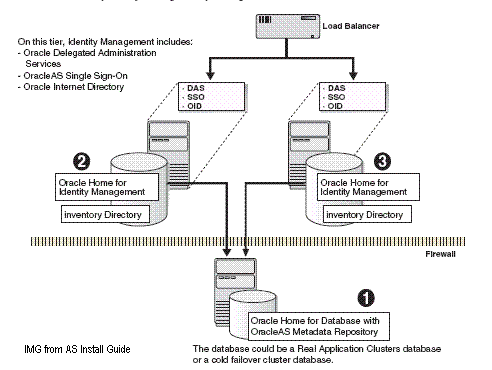
 Identity Management is Infrastructure component of Application server in Fusion Middleware Family. Identity Management is Infrastructure component of Application server in Fusion Middleware Family.
Oracle's Identity Management Components include -
SSO - Oracle Single Sign-On Server
OID - Oracle Internet Directory
DAS - Delegated Administrative Services
DIP - Directory Integration & Provisioning Services
OCA - Oracle Certifying authority (Optional)
I am going to cover them in detail in my future posts, These Services & Component are quite important for Apps DBA as IM (Identity Management) is part of Oracle Apps Release 12.
This post covers overview & important notes w.r.t. to Identity Management Cluster where IM component are in Active Active scenario, which means IM components (OID, SSO, DAS) are available on both nodes for High Availability .
For IM underlying database can be single Instance database or Two or Multiple Instance RAC (Preferably atleast Two Node)
Distributed / Non Distributed IM
Distributed IM means IM components (SSO, DAS, OID) are distributed on more than one machine (SSO & DAS on one machine & OID on second machine).
Non Distributed IM means all IM components are on same machine.
You can cluster both Distributed or Non Distributed Identity Management
Here are few Notes/Checks which I learnt from my various Implementations
Things you should know before starting Installation
- Check if you want Distributed or Non-distributed IM Cluster
- Virtual Name of HTTP Server (Infra for SSO & OIDDAS) and protocol (http or https)
- Virtual Name of OID including port (SSL & NON-SSL, you need both. Default is 389 & 636 resp)
- Communication protocol requirement (HTTP or HTTPS) between
CLIENT -> Load Balancer -> HTTP Server
things you must do before Installing Oracle AS Identity Management Cluster
- synchronize system clock on all server (which are part of cluster) with in 250 second
- set cookie persistence at load balancer specifically for URI /oiddas/ , If your browser doesn't support persistence setting at URI level then set for all HTTP Traffic (Set cookie to expire when browser session expires)
- Before Installing firt OID Node make sure TCP monitoring is not enabled on Load Balancer on first node
- Configure load balancer to return immediately to calling clients
Things/Tips which will be handy for AS Cluster (IM Type)
- For first OID Node Installation, make sure MR is not registered with any OID else it will fail. Installer checks that & if it finds that MR is already registered it assumes first node & asks for first OID node information to make it part of OID cluster
- Choose similar component on other node of cluster (i.e. If node first Node you have OID & DAS then on other Cluster node also Install OID & DAS)
- To access OID on any OID node in cluster , you have to use Password for ias_admin on first installation and not ias_admin password used second , third or further installation of Instance in cluster (oiddas, orasso, oidmon)
- For IM Cluster you always select IM and not IM+MR (This is during Installation Screen)
- For IM content database should already be loaded with Metadata Repository using Repca or MRCA (Repository Creation Assistance or Metadata Repository Creation Assistance)
- Installation steps for first OID Node is different than subsequent Node
- For IM Cluster , never select IM+MR during Installation screen , always select IM only.
- You have to select HA (High Availability) during Installation Options.
More on Indentity Management Cluster Installation..
Enable Apex Applications for SSO authentication ..
Coming soon ....
Now register for E-mail notification via "Email Subsciption" on your right Menu BarLabels: 10gAS, advanced, oid |
We have moved to kindly check onLineAppsDBA.com in future
|
|
|
|
del.icio.us
¦
Digg This
¦
My Yahoo
¦
Reddit
¦
BlinkList
¦
Furl It
¦
Email This
¦
Leave Your Comments
|
| posted by Atul Kumar @ 7:30 PM
|
|
|
|
|
|